Use VRChat SDK Example Central
Example Central is the VRChat SDK window for browsing, downloading, and modifying official examples. Each listing includes details such as its version, tags, guide, example scene, and a published VRChat world when one is available.
Read the example guide before importing its Unity package, then record the version and test the supplied scene.
- Open VRChat SDK > 🏠 Example Central.
- Select an example, read its details, and open Docs.
- Choose Import, review the package contents, and test the example scene.
VRChat currently lists world examples in Example Central and says avatar examples will be added later. Your VRChat account must have a trust rank of New User or higher to use the service.
Open the Window
Open a Worlds SDK project through VRChat Creator Companion. In Unity, choose VRChat SDK > 🏠 Example Central.
Example Central has two main areas:
- The left side lists available examples and supports searching by tags.
- The right side shows information and actions for the selected example.
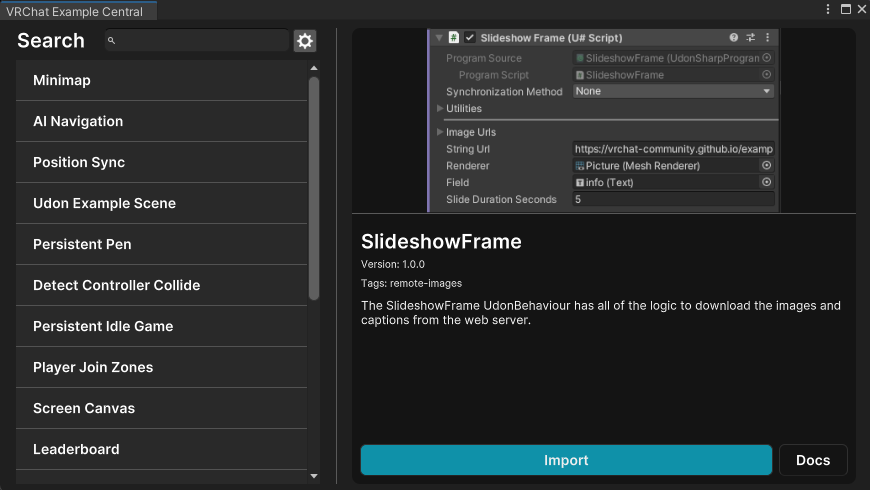
If the window is empty, wait for the list to load before changing packages or project settings. A missing list is different from a missing VRChat SDK menu.
Read the Listing Before Importing
Use the information panel to answer these questions:
| Listing field | What to record |
|---|---|
| Title | The example you are importing |
| Version | The version shown before import |
| Tags | The SDK systems or concepts involved |
| Description | The purpose and intended behavior |
| Docs | Required setup and walkthrough steps |
| Example world | Expected behavior in VRChat on supported platforms |
Press Docs before Import. The documentation is part of the example and may describe controls, scene requirements, or behavior that is not obvious from the prefab names.
Import the Unity Package
Press Import to download and open the example's .unitypackage. Unity then displays an Import Unity Package window containing the assets selected for installation.
Before confirming:
- Expand the asset list and note its top-level folder.
- Check whether the package contains scenes, scripts, prefabs, materials, or other dependencies.
- Leave required dependencies selected.
- Record the example name and version outside the imported folder.
- Select Import and wait for Unity to finish compiling.
Unity places imported package content in the project's Assets folder. Do not move or rename files in Windows Explorer; make asset changes through Unity so their .meta files remain paired correctly.
Find the Example Scene
After import, use the Project window search field to locate assets by type:
| Search | Result |
|---|---|
t:Scene |
Imported example scenes |
t:Prefab |
Reusable example objects |
t:UdonSharpProgramAsset |
UdonSharp program assets, when present |
t:Material |
Materials supplied with the example |
Open the example scene specified by the listing or guide. If Unity asks whether to save the current scene, save your work before switching.
Inspect the supplied scene before copying objects elsewhere:
- Select the top-level example objects in the Hierarchy.
- Check every component for missing object references.
- Identify the Udon Behaviours, program assets, colliders, UI, and station or pickup components involved.
- Look for instructions placed in the scene, Inspector, or documentation.
- Check the Console for compile errors before entering Play Mode.
Test the Supplied Scene
Press Play to test compatible interactions with ClientSim. VRChat documents ClientSim as an editor simulation that supports common features such as pickups, Interacts, UI, and Stations.
ClientSim is not a full VRChat client. Networking serialization and other systems can behave differently, so complete both stages:
- Test the basic interaction in Unity Play Mode.
- Build the example scene and test it in VRChat before depending on the behavior in a world.
If the listing provides a published example world, visit it to compare the intended PC and mobile behavior with the imported scene.
Move the Pattern into Your World
Once the example works in its supplied scene, identify the smallest complete set of objects and assets that provide the feature.
Use this transfer checklist:
- Copy the required prefab or documented root object.
- Preserve its child hierarchy.
- Reassign scene-specific references after copying.
- Confirm layers, colliders, triggers, and UI event targets.
- Retest ownership and synchronization in VRChat when networking is involved.
- Keep the imported example folder intact until the adapted version passes testing.
Copying only the visible GameObject can omit scripts, program assets, materials, or referenced scene objects. Use the Inspector to follow each dependency rather than guessing from the hierarchy.
Record and Update Example Versions
Example Central shows the newest version of each listing and uses Semantic Versioning. VRChat also documents a current limitation: after import, Example Central does not show which version is installed in the project.
Keep a small project note when importing:
| Record | Example |
|---|---|
| Example title | Exact title from Example Central |
| Imported version | Version displayed at import time |
| Import date | Date the package entered the project |
| Imported folder | Top-level path under Assets |
| Adapted objects | Objects copied into the world scene |
When a newer version appears, inspect it in a duplicate project or backed-up project first. Compare its guide and asset list with the installed copy before importing over modified files.
Creator Economy Examples
The gear beside the search field opens Example Central settings. VRChat currently lists one setting: Show Creator Economy Examples.
That setting is disabled by default because those examples are in beta testing. VRChat warns that they will not function correctly for accounts that are not beta testers.
Troubleshooting
The VRChat SDK menu does not appear in Unity.
Confirm this is a VRChat Worlds project managed through Creator Companion. Resolve package and Console errors first; Example Central cannot open when the SDK itself has not loaded.
Example Central opens, but no examples appear.
Confirm the editor has network access and that the signed-in VRChat account meets the documented New User trust requirement. Reopen the window after the SDK finishes loading.
I cannot find avatar examples.
VRChat currently documents only world examples as available. Avatar examples are listed as a future addition.
The example imported, but I cannot find its scene.
Search the Project window for `t:Scene`, then inspect the imported top-level folder. Return to the example's Docs page to confirm the intended scene or prefab name.
The supplied scene works, but the copied prefab does not.
Compare the prefab's Inspector references with the supplied scene. Reassign scene objects, UI targets, colliders, and Udon references that could not transfer automatically.
I cannot tell whether the imported example is current.
Example Central does not currently display an installed version. Compare the version you recorded at import time with the newest listing, and inspect updates in a backed-up project before replacing files.
Official References
- VRChat Example Central
- VRChat ClientSim
- VRChat SDK Getting Started
- Unity 2022.3: Import a Local Asset Package
- Unity 2022.3: Importing Assets
