VRChat World Building
Start with the practical world-building guides, then use the design principles below when you need to check player flow, readability, comfort, and scope.
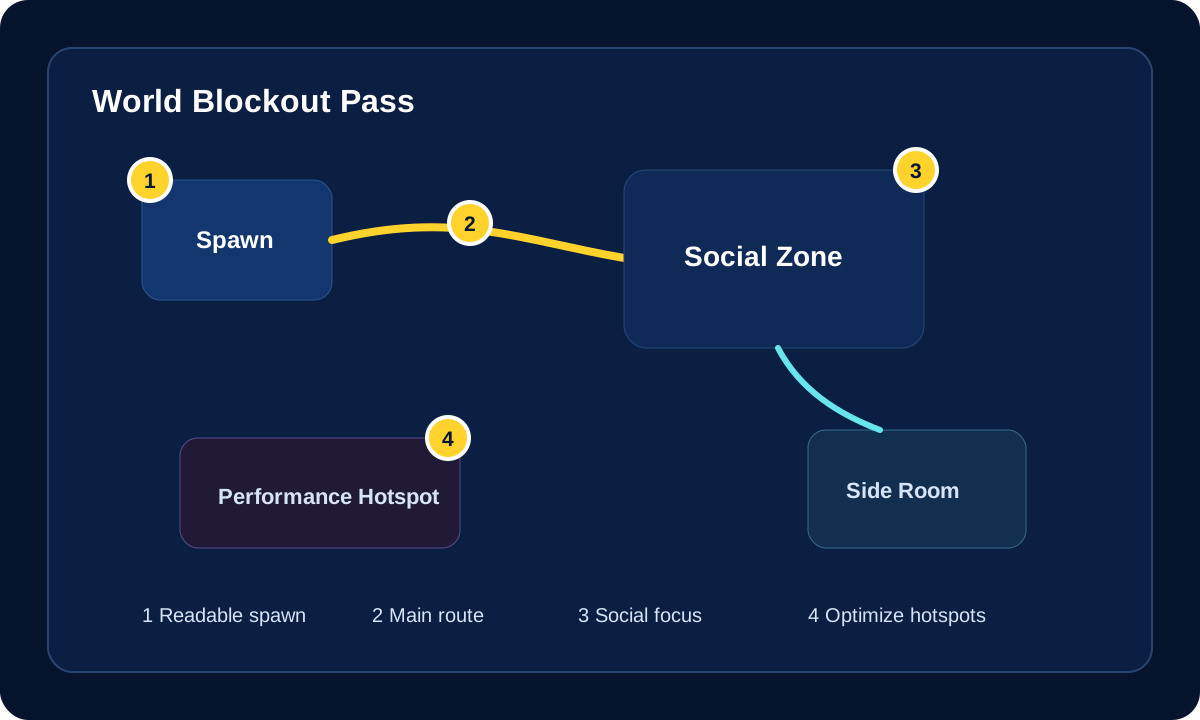
Playlist Companion
This page pairs well with the world-start playlist when you want a concrete blockout example to sit beside the design principles and route planning below.
Practical follow-up: [ProBuilder for grey-boxing in Unity](https://www.youtube.com/watch?v=YsBniZ5ya7k)
Community World References
These `awesome-vrchat` picks fit best after the blockout and upload basics are already clear.
Build In A Safer Order
Work from core setup into world structure, then add Udon, prefabs, optimization, and publishing checks as the project becomes more complete.
Start here if you are planning
Use this stage to define what the world is for before you commit too hard to art, effects, or systems.
- Decide the world type: social, event, exploration, teaching, or game.
- Plan the spawn, main route, social hubs, and quieter side spaces.
- Use the principles section below to pressure-test readability and player flow.
Start here if you are building
Use this stage when the project is active and you need the practical docs that unblock real implementation work.
- Set up Creator Companion and confirm the correct Unity and Worlds SDK workflow.
- Use world creation, Udon, prefabs, and reference docs as you add features.
- Check components and layers before relying on Unity behavior that VRChat may override.
Start here if you are shipping
Use this stage when the world mostly works and you need to stabilize performance, publish cleanly, and catch issues before release.
- Run the optimization checklist on mirrors, textures, lighting, and likely crowd hotspots.
- Check PC and Quest/Android expectations before promising cross-platform support.
- Use the upload guide for the normal publish flow and metadata checks.
- Use troubleshooting only when validation, build, or publish steps fail.
Choose Your Route
Different creators hit this hub with different goals. Use the route that matches what you are doing right now.
Starting a new world
Begin with project setup, then move into the world creation overview before adding systems.
Adding features and systems
Use the world as a base, then move into Udon, prefab systems, and reference pages for safer implementation.
Optimizing and cleaning up
Trim the scene, fix hotspots, and verify platform-specific behavior before calling the world done.
Uploading and fixing publish issues
Use the publishing path when the build is ready but the final validation, upload, or live test is blocking you.
VRChat World Building Docs
These are the most relevant internal docs for building VRChat worlds, not general site filler.
Setup and world planning
Use these first when the project is still being created or the overall build path is still fuzzy.
World systems, scripting, and reference pages
Move here when the scene exists and you are deciding how to structure interactions, layers, components, and prefab-based features.
Move into scripting, interactivity, and world logic once the base scene structure is solid.
Systems VRChat PrefabsBrowse prefab-driven world systems for audio, UI, interaction, utility, and gameplay features.
Reference Allowlisted World ComponentsCheck what Unity components are safe to rely on inside VRChat worlds.
Reference Unity Layers In VRChatUnderstand reserved layers, collisions, raycasts, and VRChat-specific layer behavior.
Performance and technical cleanup
Use these when the world mostly works but still needs to become lighter, safer, or more platform-ready.
Reduce framerate, filesize, lighting, mirror, and multiplayer performance problems before release.
Platform Quest Compatibility ChecklistReview mobile constraints before treating a PC-friendly world as cross-platform-ready.
Beginner Understanding World PerformanceA gentler explanation of why player count, avatars, mirrors, lighting, and textures affect comfort.
Upload and release workflow
Use these once the world is ready for validation, upload, and real in-client testing.
Useful World Tutorials
Extra internal routes that are still world-specific and worth keeping close.
Core World-Building Principles
The strategic guidance is still useful. It is just organized so you can open what you need instead of reading one long uninterrupted page.
1. Purpose and audience
Before importing assets or polishing visuals, decide what the world is actually for. Social lounges, event spaces, exploration worlds, teaching spaces, and game worlds all need different decisions.
- Decide whether the world is private, public, beginner-friendly, or community-focused.
- Decide whether it is meant for one-off visits or repeat use.
- Decide whether it is designed for intimate groups or larger concurrency.
- Match the build priorities to the world type instead of treating every map the same.
2. Layout and social flow
Many VRChat worlds fail because players do not know where to go, where to gather, or how the space is meant to work.
- Make spawn readable and purposeful.
- Use landmarks, sightlines, and lighting cues to guide movement.
- Create both main hubs and quieter side spaces.
- Check whether late joiners can re-enter the social flow without confusion.
3. Readability, visuals, and interaction
Atmosphere matters, but readability matters more. A dramatic world that is hard to read or use will still feel weak once real players arrive.
- Keep lighting readable around faces, stages, routes, and important interaction points.
- Use contrast and composition to separate key areas from background detail.
- Do not hide essential functions behind decorative clutter or mystery interactions.
- Make the intended use of a space obvious from placement and framing.
4. Performance and optimization
A world that only feels good when empty is not finished. Performance needs to support the real multiplayer use case, not just the editor view.
- Optimize the spawn, main hub, and any likely crowd hotspot first.
- Watch geometry, materials, texture sizes, mirrors, particles, transparency, and dynamic lights.
- Test with realistic avatars and real player density.
- Test platform-specific builds separately instead of assuming the PC result proves the Quest result.
- Use the optimization checklist before treating a world as done.
5. Production workflow and shipping
Good workflow is part of good world building. Clean projects and deliberate testing produce better worlds than random iteration.
- Define purpose and audience.
- Greybox and test route flow early.
- Add core lighting, atmosphere, and interaction deliberately.
- Optimize hotspots before the final publish push.
- Test with other players, then ship with a cleaner release process.
Official References
- Creating Your First World
- World Creation, Optimization, and Community Labs Tips
- VRChat Udon
- UdonSharp
- World Components
- Object Sync
Related Navigation
Add Systems Only After The World Has A Clear Shape
Plan player flow, optimization, and testing before layering in prefabs, Udon systems, or final polish.
Suggested Order
- Define the world purpose Decide whether the world is social, event-focused, game-like, educational, scenic, or utility-driven before choosing systems.
- Block out and test movement Use ProBuilder or simple geometry to test spawn, routes, gathering spaces, sightlines, and comfort.
- Add interactions in layers Use ClientSim, prefab tests, Udon networking checks, and VRChat uploads as separate QA steps.
Related VRCreators Guides
- ClientSim World Testing Use this for fast Unity Play Mode checks before a full upload.
- Udon Networking Decision Guide Use this before syncing doors, toggles, scores, timers, or player state.
- VRChat Persistence, PlayerData, And PlayerObjects Use this before saving scores, unlocks, preferences, or player-owned objects.
Common Questions
When should I add Udon systems to a VRChat world?
After the basic scene flow works. Add local systems first, then synced systems, then persistence only where saved state is truly needed.
Should a world be designed differently for Quest and Android?
Often yes. The mobile version may need simpler materials, fewer effects, clearer UI, and more direct testing than the PC version.
