Allowlisted Components in VRChat Worlds
VRChat maintains an allowlist of scripts and components that can be used in uploaded worlds. VRChat's documentation states that a component outside the list will not work in a world.
Use the official Allowlisted World Components list for the current component-by-component answer. This guide explains how to apply that list when importing Unity assets, reading SDK errors, and testing PC and Android builds.
Inspect unfamiliar components before building a world system around them.
- Find the exact component type in the Unity Inspector.
- Search VRChat's current allowlist for that type and read any linked restrictions.
- Run the SDK Builder and test the uploaded world on every target platform.
Unity Play mode is not proof that a component will work after upload. The Unity editor can execute ordinary MonoBehaviour scripts and editor tooling that VRChat does not permit in a world build.
What the Allowlist Covers
The official list groups permitted components into these categories:
| Category | Examples on the official list |
|---|---|
| Unity components | Renderers, colliders, audio, particles, terrain, navigation, constraints, UI, and video |
| VRChat components | Scene Descriptor, Pipeline Manager, stations, mirrors, spatial audio, contacts, and PhysBones |
| TextMesh Pro | Text, input, dropdown, submesh, and related UI components |
| Unity Event System | EventSystem, raycasters, input modules, and event triggers |
| Unity UI | Buttons, toggles, sliders, layout groups, masks, images, and scroll views |
| Post Processing Stack V2 | Post-process layer, volume, and debug components |
| AVPro | Media player display, audio output, subtitles, and material/mesh output |
| Oculus Spatializer | Supported Oculus spatial-audio components |
| Final IK | A defined set of Final IK components with VRChat-specific behaviour |
The official page is the complete list. Category membership alone does not permit every component from a package or namespace.
Check an Imported Prefab
An asset can be compatible with ordinary Unity projects without being compatible with VRChat worlds.
- Import the asset into a backed-up project or a separate test project.
- Select the prefab root.
- Expand every child in the Hierarchy.
- Inspect the components on each GameObject.
- Record unfamiliar component type names exactly as Unity displays them.
- Search the official VRChat allowlist.
- Check the Console for missing scripts or compile errors.
- Open the VRChat SDK Builder and read the validation messages.
Imported-asset decision table
| Finding | Action |
|---|---|
| Every required component is allowlisted | Continue to SDK and runtime testing |
| A required MonoBehaviour is not allowlisted | Replace the system or use a supported Udon/UdonSharp implementation |
| An optional unsupported component is present | Remove it from a test copy and verify the prefab still works |
| The asset contains editor-only tooling | Keep editor tooling out of the runtime scene and validate the built world |
| A component is deprecated | Migrate to the replacement linked by VRChat |
| The prefab has missing scripts | Restore the dependency or remove the broken component deliberately |
Do not remove an unknown script from the production prefab before understanding what it controls. Work in a backup or test copy.
Common VRChat World Components
These VRChat components appear on the current official allowlist:
| Component | Typical role |
|---|---|
VRC_SceneDescriptor |
Defines the scene as a VRChat world and exposes world settings |
VRCPipelineManager |
Stores the content blueprint association used by the SDK |
VRC_SpatialAudioSource |
Adds VRChat-specific spatial-audio configuration |
VRC_MirrorReflection |
Provides a VRChat mirror |
VRC_Station |
Defines a station or seat |
VRC_AvatarPedestal |
Displays an avatar pedestal |
VRC_MidiListener |
Receives supported MIDI input |
VRC_UiShape |
Marks compatible world-space UI interaction surfaces |
VRCContactSender and VRCContactReceiver |
Provide world contact interactions subject to shape limits |
VRCPhysBone, VRCPhysBoneCollider, and VRCPhysBoneRoot |
Provide supported secondary-motion components |
Required World Setup Is a Separate Question
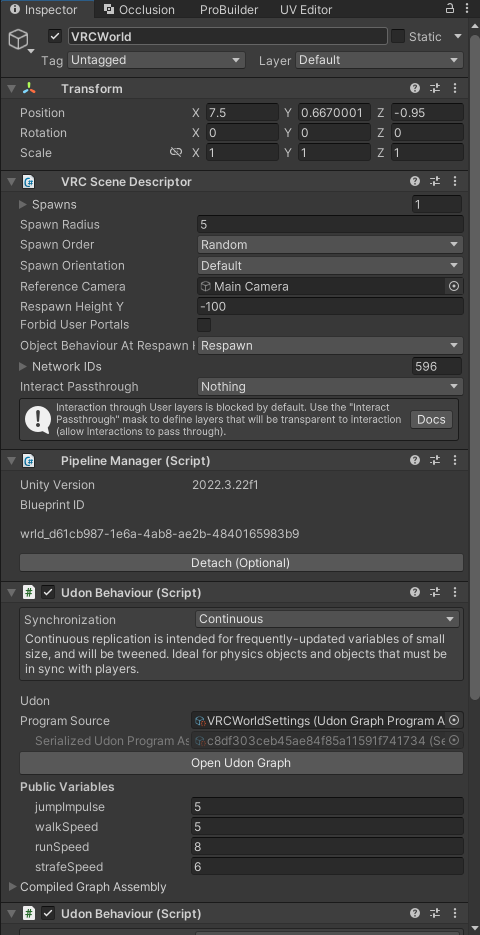
Being allowlisted does not make a component required. A basic VRChat world needs a scene prepared through the Worlds SDK, including a VRC_SceneDescriptor. Other components are added only when the world uses their features.
Likewise, an allowlisted component is not automatically:
- performant
- networked
- supported on every platform
- configured correctly
- suitable for the intended interaction
The allowlist answers whether the component can be used. Its own documentation and runtime tests answer how it behaves.
UdonSharp Is Not an Ordinary MonoBehaviour
VRChat includes UdonSharp in the Worlds SDK. An UdonSharp script inherits from UdonSharpBehaviour and compiles C# into Udon Assembly.
This differs from importing an arbitrary Unity script that inherits from MonoBehaviour:
| Script type | VRChat world workflow |
|---|---|
UdonSharpBehaviour |
Compiles to Udon and uses the APIs exposed to UdonSharp |
| Udon Graph program | Runs through the Udon VM |
Ordinary runtime MonoBehaviour |
Does not become supported merely because it compiles in Unity |
| Custom editor script | May assist authoring in Unity but must not be treated as world runtime behaviour |
UdonSharp does not expose every C# or Unity API. Check VRChat's UdonSharp documentation and Class Exposure Tree before designing around a library or method.
Deprecated Components
The official allowlist currently marks these older systems:
| Deprecated component | Current direction |
|---|---|
VRC_IKFollower |
Use VRChat Constraints or supported Unity Constraints |
DynamicBone |
Use VRChat PhysBones |
DynamicBoneCollider |
Use VRChat PhysBone Colliders |
| Post Processing Stack v1 | Use the supported Post Processing Stack v2 components listed by VRChat |
Do not introduce a deprecated system into a new world simply because the component remains listed for compatibility.
Shape and Component Limits
VRChat attaches maximum-shape restrictions to:
VRCContactReceiverVRCContactSenderVRCPhysBoneVRCPhysBoneCollider
An allowlisted type can therefore still fail validation or behave incorrectly when its configuration exceeds a documented limit. Follow the component-specific page linked from VRChat's allowlist.
Final IK Behaviour
VRChat's allowlist includes a defined set of Final IK components, but VRChat states that its Final IK implementation is highly modified. Custom Final IK configurations are not directly supported or tested and may not behave as external Final IK documentation describes.
Test the exact behaviour in an uploaded world. Do not rely on Unity Play mode alone for Final IK validation.
PC and Android Differences
VRChat's allowlist page explicitly notes that Android has exceptions. A component appearing on the main allowlist does not prove that it will behave identically on PC, Android phones, iOS, or Meta Quest.
For a cross-platform world:
- Switch the project to the intended platform.
- Read the platform-specific SDK validation results.
- Build and test the PC version.
- Build and test the Android version.
- Compare interactions, media, shaders, post processing, audio, and performance.
Use platform-specific alternatives or conditional world design when a feature is unavailable.
Use the SDK Builder
Open VRChat SDK → Show Control Panel → Builder before upload.
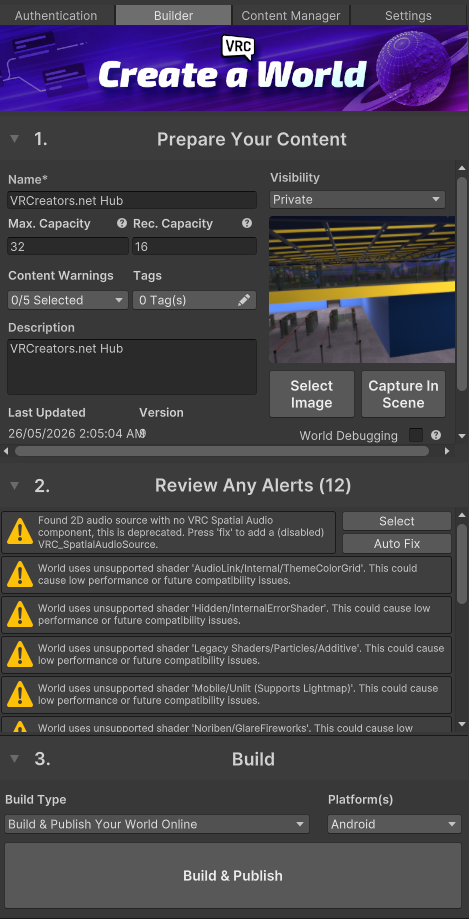
For each error:
- Read the full message.
- Select or locate the referenced GameObject.
- Identify the exact component type.
- Check whether it is allowlisted.
- Follow the component documentation or replace the unsupported system.
- Run validation again.
Warnings still require review even when they do not block the build.
Runtime Test Checklist
| Test | What it proves |
|---|---|
| SDK validation | The project passes the SDK's current pre-build checks |
| Local Build & Test | The component survives the VRChat build and runs in the client |
| Second client or user | Networked behaviour is visible to another player |
| Late join | State is correct for someone joining after interaction |
| Instance master change | Ownership-dependent behaviour recovers correctly |
| PC build | Desktop runtime behaviour works |
| Android build | Mobile runtime behaviour and limitations are understood |
| Re-enter world | Initialization remains correct after a fresh load |
The allowlist does not test networking or persistence. Those behaviours must be validated separately.
Troubleshooting
A component works in Unity but is absent after upload.
Find its exact type in the Inspector and search the current official allowlist. Ordinary Unity scripts can execute in Play mode without being permitted in the VRChat runtime.
The SDK reports an unsupported script on an imported prefab.
Identify what the script controls. Replace it with a supported Udon or UdonSharp system, use the publisher's VRChat-specific version, or remove the feature from a backed-up test copy.
The prefab contains missing MonoBehaviour entries.
Check the asset's documented dependencies and import order. Restore the required package when it is supported, or remove the broken component deliberately after confirming the prefab does not need it.
An allowlisted component still fails SDK validation.
Read the full validation message and the component-specific documentation. The type may be permitted while its configuration, count, shape, dependency, or target-platform use is invalid.
The component works on PC but not Android.
Check VRChat's Android exceptions and the platform-specific SDK results. Replace the feature, provide an Android alternative, or remove it from the mobile build.
My UdonSharp script cannot access a Unity class or method.
Check the UdonSharp Class Exposure Tree and supported-language documentation. UdonSharp compiles to Udon and does not expose every normal C# or Unity API.
A deprecated component still appears on the allowlist.
Allowlisting can preserve compatibility without recommending the component for new work. Follow VRChat's linked replacement guidance for the current system.
Final IK behaves differently after upload.
VRChat uses a modified Final IK implementation and does not directly support custom implementations. Test the allowlisted configuration in-world and redesign behaviour that depends on unsupported assumptions.
Next Steps
- Create and upload a VRChat world
- Use Unity layers in VRChat
- Run the world upload troubleshooting checklist
- Review world performance
- Return to VRChat creator guides
Official References
- VRChat: Allowlisted World Components
- VRChat: UdonSharp
- VRChat: Creating Your First World
- VRChat: Android Content Limitations
Topics: VRChat world components, component allowlist, UdonSharp, SDK validation, Android worlds
