VRChat World Creation Guide
This page is the overview route for creators who want to build VRChat worlds without getting lost in isolated tutorials. Use it as the top-level map before you drill into setup guides, world-building design, prefab systems, optimization, or upload troubleshooting.
Build the world in layers: stable project, readable blockout, core systems, optimization, then upload testing.
- Start with Creator Companion and the correct Unity version.
- Block out movement and social flow before detail work.
- Test performance and upload readiness before a public release.
VRChat worlds are social spaces, not just Unity scenes. Scene descriptor setup, spawn clarity, player flow, optimization, and upload workflow all shape the final experience.
Playlist Companion
The Create Your First VRChat World playlist follows the same build stages, with each section below linking to the matching guide.
Use the playlist alongside the written docs in this order:
- Create Avatars & World Projects - VRChat Creator Companion with Setting Up VRChat Creator Companion
- Modeling and the ProBuilder videos with World Building and ProBuilder Blockout Workflow for VR Worlds
- Textures and Materials with Creating and Managing Materials
- Lighting with Set Up a Skybox and Environment Lighting in Unity
- External Assets and Prefabs, Mirrors with UI, and VRC Prefabs with VRChat Prefab Hub
- Udon and Pickupables and Physics with UdonSharp Guide, ClientSim World Testing, and Using Example Central In The VRChat SDK
- Synced world systems with Udon Networking Decision Guide and VRChat Persistence, PlayerData, And PlayerObjects
- Uploading to PC & Quest and the Quest videos with How to Upload a World in VRChat and Quest Compatibility Checklist
What world creation includes
VRChat world creation is more than importing assets and pressing upload. A strong world usually combines:
- project setup that stays stable
- a scene descriptor and spawn setup that VRChat can validate
- layout and social flow that make sense to players
- interaction systems that are easy to read
- optimization choices that hold up with real users
- a publishing workflow that avoids last-minute surprises
First-World Readiness Checklist
| Area | Ready Means |
|---|---|
| Account | Your VRChat account can build/test locally, and you understand upload permission requirements. |
| Project | The world project was created or managed through VRChat Creator Companion. |
| Unity version | The project opens in the supported Unity version for the current VRChat SDK. |
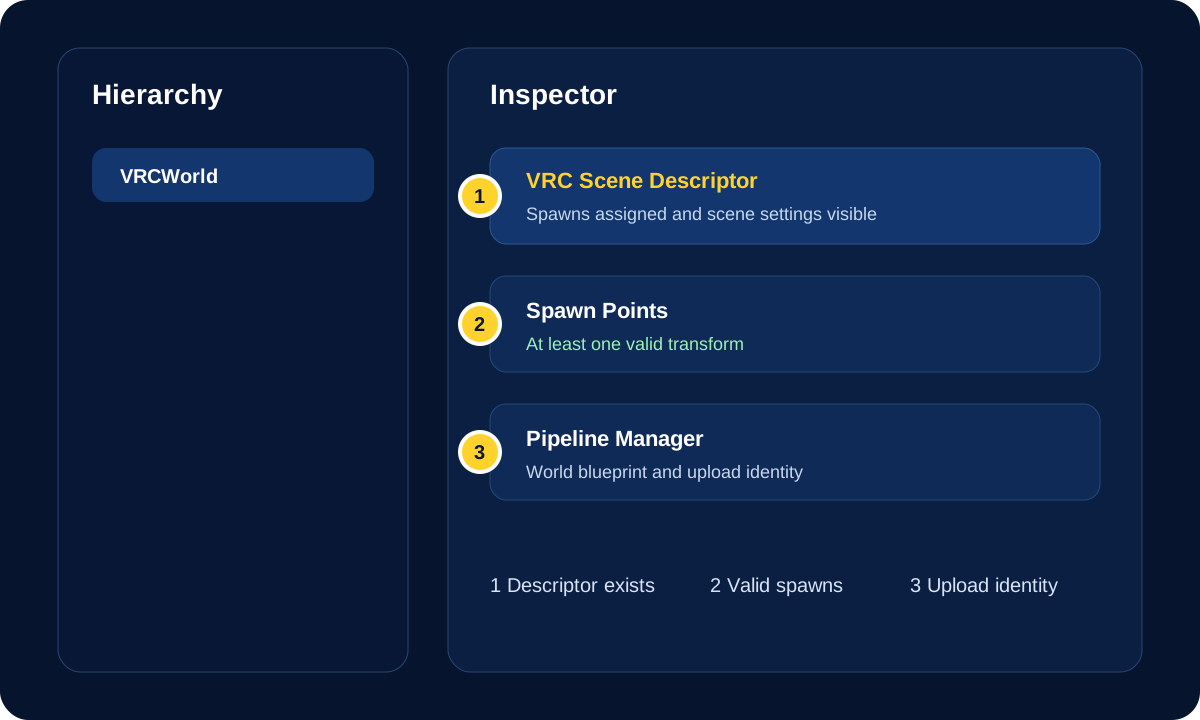
| Scene descriptor | The scene has a VRC Scene Descriptor or VRCWorld object. |
| Spawn points | Players have at least one clear, assigned spawn point above walkable ground. |
| Build panel | The SDK Builder tab has been checked for validation warnings before upload. |
| Test pass | Build & Test has been used before a public or wider release. |
Recommended build path
If you are starting from scratch, move through the site in this order:
- Set up your project with Setting Up VRChat Creator Companion.
- Learn the overall design mindset with World Building.
- Add the world descriptor, spawns, and basic metadata before complex systems.
- Add practical scripting from UdonSharp Guide and the current Udon Documentation.
- Review performance with Optimization Guide, World Optimization Checklist, and Quest Compatibility Checklist.
- Publish with How to Upload a World in VRChat.
Core creation pillars
Project setup
Start with a healthy Unity and Creator Companion setup before you add content.
- Setting Up VRChat Creator Companion
- Creator Companion Troubleshooting Guide
- Fix Your First Broken VRChat Project
- Unity Version Guide for VRChat Creators
World design
Build the world around player behavior, not only visuals.
Descriptor and upload basics
Make sure Unity knows the scene is a VRChat world before you get deep into polish.
- Add or confirm the
VRC Scene Descriptor. - Set spawn points intentionally.
- Review capacity, reference camera, respawn height, and world metadata.
- Use the SDK Builder validation list before trying to publish.
- How to Upload a World in VRChat
- World Upload Troubleshooting Checklist
Systems and prefabs
Add interaction systems once the space itself makes sense.
Optimization and publish readiness
Treat optimization as part of world design, not as cleanup at the very end.
- Optimization Guide
- World Optimization Checklist
- Quest Compatibility Checklist
- World Upload Troubleshooting Checklist
Common beginner mistake
Before detail work, set the basic structure:
- establish purpose
- block out the world
- test movement and readability
- add core systems
- optimize hotspots
- upload and test with other people
That order usually saves more time than trying to repair a fully detailed but unclear or heavy scene later.
Help! I want to start with details and decoration.
Block out the world first. Movement, scale, sightlines, and social flow are much easier to fix before the scene is full of detailed assets.
Help! I do not know what the scene descriptor is.
The scene descriptor tells VRChat that the Unity scene is a world. Use the SDK Builder tab to add or verify it, then set spawn points and world settings before publish testing.
Help! When should I add Udon systems?
Add core interaction systems after the space is readable. Systems are easier to test when the layout already supports the behavior you want.
Help! When should I optimize?
Start early with lighting, occlusion, materials, and heavy feature choices. Waiting until the end makes every optimization decision more expensive.
Official References
- VRChat Worlds
- Creating Your First World
- World Components
- VRC Scene Descriptor
- Allowlisted World Components
- World Creation, Optimization, and Community Labs Tips
