World Optimization Checklist For VRChat Creators
Optimize the parts players actually experience first: spawn, social hotspots, lighting, mirrors, media, and Android readiness.
- Test with realistic avatars and player counts, not only an empty editor scene.
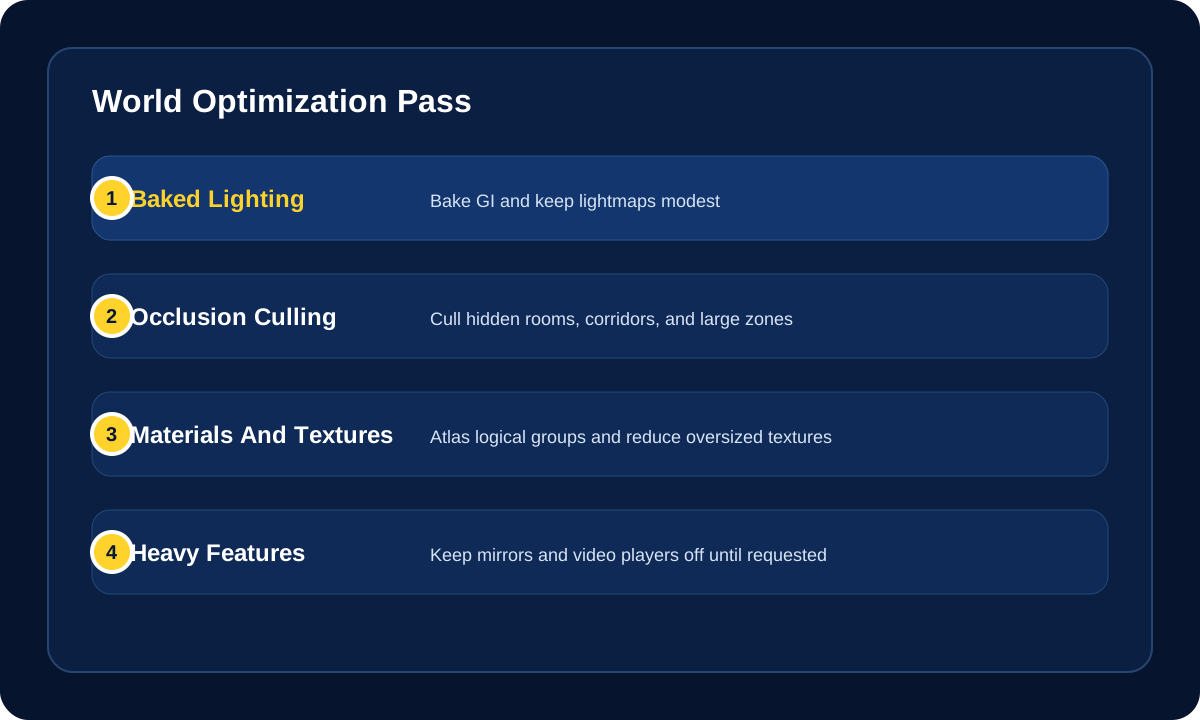
- Bake lighting and occlusion before relying on expensive real-time features.
- Use toggles and limits for mirrors, video players, and heavy effects.
World optimization affects comfort, Community Labs readiness, Quest access, and whether social spaces hold up when real players arrive.
Use this page before publishing a world, submitting to Community Labs, or calling a scene "finished." The goal is not only to make a world lighter in the Unity editor. The goal is to make it hold up when real players, real avatars, mirrors, video, networking, and platform differences all hit at once.
Playlist Companion
These videos fit this checklist because they hit two of the most common late-stage world problems directly: expensive mirrors and the Android or Quest handoff.
Quest build workflow reference
Performance-heavy feature follow-up
Quick Decision
| Situation | Best move |
|---|---|
| The world feels fine alone but bad with people inside | Optimize for actual multiplayer hotspots, not your empty test scene. |
| You want Android or Quest support | Build around mobile limits early instead of trying to "mobile port" at the end. |
| The world is visually rich but hard to ship | Fix lighting, occlusion, materials, and mirrors before chasing tiny mesh cleanups. |
| You want the world to survive Community Labs review better | Treat performance and filesize as publishing requirements, not optional polish. |
Measure Before You Guess
- Use the Unity Profiler to identify expensive rendering, scripts, physics, and animation costs instead of optimizing randomly.
- Check SDK build output and editor logs for build statistics, especially when chasing Android filesize and texture-memory issues.
- Compare spawn, the main social area, and the worst-case mirror/media area separately.
- Test the Android build directly when Android or Quest support matters; a strong desktop PC profile does not prove mobile performance.
- Re-test after major imports, lighting changes, shader swaps, or world-system additions.
Core Checklist
- Profile the spawn area first because that is where first impressions and Community Labs checks often begin.
- Aim for at least
45 FPSwith a single VR user at spawn. - Test with other players and realistic avatars, not only by yourself in an empty session.
- Keep the hierarchy, materials, and object grouping organized enough that you can still optimize without breaking the scene.
- Recheck performance after every major content pass, not only at the end.
File Size And Geometry Checklist
- Keep Android world builds under VRChat's hard
100 MBcompressed upload limit. - Treat
200 MBas a practical upper warning zone for public-world filesize expectations even on broader world publishing guidance. - For Android or Quest targets, budget roughly
250,000world triangles total so players still have room for avatars. - Treat draw calls and material count as seriously as triangle count.
- Reduce unnecessary meshes and materials, but do not merge so aggressively that you ruin occlusion culling opportunities.
- Atlas materials by logical object groups instead of flattening unrelated scene pieces together.
- Keep textures modest. For many mobile-facing assets,
1024x1024should be your default ceiling until something proves it needs more. - Remember that Crunch compression can reduce download size without solving in-memory texture cost.
Lighting And Visibility Checklist
- Bake lighting wherever possible.
- Treat real-time lights as expensive and avoid overusing them.
- Use light probes where they help dynamic objects read correctly without forcing heavier lighting setups.
- Keep lightmap resolution lower than your first instinct. A lower lightmap often still looks good and costs much less.
- Bake occlusion culling for spaces with walls, rooms, corridors, or hidden zones.
- Preserve object boundaries that matter for culling. Do not merge a whole building into the ground mesh if you want Unity to stop rendering it when hidden.
- Check the heaviest view angles, not only the average view of the scene.
Shader And Effects Checklist
- Avoid expensive shaders that are not VR-friendly.
- For Android or Quest paths, prefer simple mobile-friendly shaders and avoid relying on heavier custom materials.
- Avoid transparency unless it is truly necessary because alpha-heavy scenes hurt mobile GPUs fast.
- Be very careful with post-processing, especially screen-space effects.
- Use a super-sampled shader for in-world UI if you need crisp text without heavier rendering costs.
Mirrors, Video, And Heavy Features Checklist
- Do not enable mirrors by default.
- Prefer one mirror at most in a space, and put it behind a user-controlled toggle.
- Treat more than one active mirror as a high-risk performance choice.
- Treat more than two video players in a room as a strong warning sign.
- Review particles, animated effects, and decorative systems in the same way: if they are always active, they need to justify their cost.
Android And Quest Checklist
- Publish an Android build if cross-platform access matters.
- If the world runs acceptably on Quest, it will usually translate better to Android mobile too.
- Test UI for touch readability and larger tap targets if mobile access matters.
- Avoid assuming that your PC materials and scene readability will carry over cleanly to Android.
- Playtest with mobile or Quest users before calling the cross-platform version done.
- Prefer baked lighting, simpler shaders, modest textures, and fewer always-active effects.
- Avoid alpha-heavy scenes where possible because transparency is costly on mobile GPUs.
Udon And Networking Checklist
- Do not network rigidbodies unless they truly need to be networked.
- Use synced variables for persistent state and events for temporary actions.
- Avoid overusing synced variables because excessive sync traffic creates bandwidth spikes and desync pressure.
- Keep ownership transfers intentional instead of frequent or automatic.
- Prefer local-only logic for visual effects that do not need shared state.
- Test with late joiners and ownership changes if the world relies on synced state.
Final Review Before Publish
- Walk the world from spawn like a new visitor.
- Test with mirrors off and on.
- Test with at least one realistic crowd or friend session.
- Confirm the world still works when avatars, audio, and interaction systems are active together.
- If Android or Quest matters, test that build directly instead of assuming the PC experience proves anything.
Help! My world feels fine when I am alone.
Test with other players and realistic avatars. Empty-world performance often hides mirror, avatar, audio, and networking costs that appear in real sessions.
Help! Mirrors or video players are expensive.
Keep them off by default, use user-controlled toggles, and avoid multiple active mirrors or video players in the same busy space.
Help! I need Quest support.
Plan Android budgets early: compressed size, simple shaders, baked lighting, reasonable textures, and direct testing on the Android build.
Help! I do not know what to optimize first.
Start with the Unity Profiler, then check the areas players actually use: spawn, the main social space, mirrors, video players, and the worst visible angle in the scene.
Help! My Android build is under 100 MB but still runs badly.
Compressed upload size is only one limit. Check texture memory, draw calls, materials, shaders, transparency, particles, lighting, and active systems on the actual Android build.
Official References
- VRChat Android Content Optimization
- VRChat Mobile Best Practices
- VRChat World Creation, Optimization, and Community Labs Tips
- VRChat Udon Networking Performance Considerations
Community optimization references
- Occlusion Culling Guide - practical community write-up for one of the most common world-optimization wins.
- How to get good at baked lighting - useful when the world needs better-looking baked lighting without jumping straight to heavier real-time effects.
- Unity Resource Checker - scene-side utility for spotting resource use in the current project.
- Resource Checker - long-running Unity utility for visibility into resource cost.
- VRWorld Toolkit - world-building helper with tooling that can support larger optimization passes.
Related Navigation
- VRChat Documentation
- World Building
- World Creation Guide
- Quest Compatibility Checklist
- Android And Mobile World Guide
- ClientSim World Testing
- Unity Performance Basics for VRChat Worlds
- Optimizing Unity3D Worlds for Performance
- VRChat Creator Guides
- Unity3D Documentation
Optimize The World Players Actually Load
Use this checklist to choose the next optimization pass: Android/mobile support, Quest budgets, ClientSim testing, or Udon networking cleanup.
Suggested Order
- Profile the real hotspots Measure spawn, social areas, mirrors, media, and the worst visible angle instead of tuning the empty editor scene.
- Split PC and Android expectations A working PC build does not prove the Android path, so check mobile shaders, file size, UI, and input directly.
- Test systems before uploading Use ClientSim for local interaction checks, then run private builds for networking, platform, and crowd behavior.
Related VRCreators Guides
- Android And Mobile World Guide Use this when optimization also needs phone, Android, and Quest player-experience checks.
- Quest Compatibility Checklist Use this for mobile shaders, file-size limits, avatar visibility, and Android upload requirements.
- ClientSim World Testing Use this to catch interaction issues before each upload.
Common Questions
Is upload size enough to prove a world is optimized?
No. Upload size matters, especially on Android, but players also feel draw calls, shaders, lighting, mirrors, video, physics, scripts, and avatar crowd cost.
When should I start Android optimization?
Start before the PC build is visually final. Mobile-friendly materials, UI, lighting, and scene structure are easier to keep than to retrofit.
